


Describe Image タスク PTE Academic, UKVI & Core の
「Describe Image」は、試験の Speaking セクションに表示される 3 番目のタスクであり、PTE (Pearson Test of English) 試験の中で最も困難だがやりがいのあるコンポーネントの 1 つです。このPTE練習タスクは、speakingスキルを評価するだけでなく、視覚情報を迅速かつ正確に観察、解釈、分析する能力もテストします。このセクションをマスターすると、全体のスコアが大幅に向上します。


PTE の Describe Image タスクとは何ですか?
PTE の Describe Image タスクでは、画面に画像が表示されます。あなたの目的は、指定された 40 秒以内に画像を詳細に説明することです。録画が始まる前に、25 秒間、画像を観察して考えをまとめ、応答を準備する時間が与えられます。このタスクでは、適切な語彙を使用して、見たものを説明するために、明確かつ一貫して話す能力を評価します。
課題は、自分の考えを素早く整理し、制限時間内に効果的に伝えることです。目標は、主な機能と関連する詳細に焦点を当てて、画像について明確、簡潔、かつ一貫した説明を提供することです。

Describe Image PTE タスクの画像の種類
試験では、説明できるさまざまな種類の画像が提示されることがあります。画像の種類ごとに異なるアプローチが必要となるため、形式を理解しておくことが重要です。
1. グラフまたはチャート:

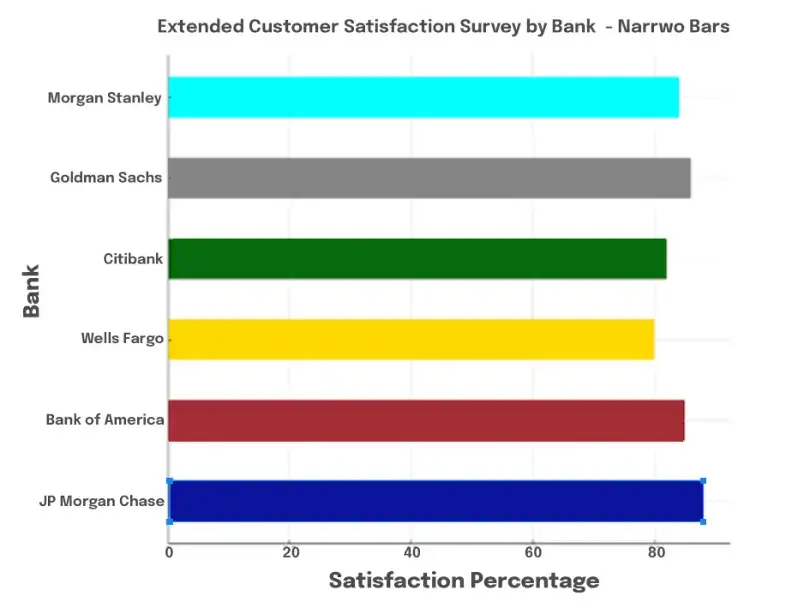
棒グラフ:
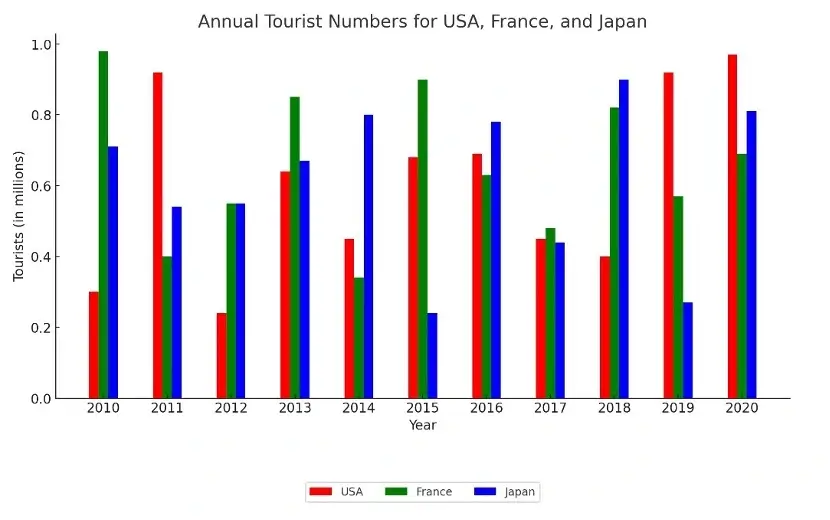
これらは、さまざまなカテゴリを表す長方形のバーを使用してデータを表示します。バーは水平または垂直にすることができ、比較と主要なデータ ポイントを説明することが仕事です。
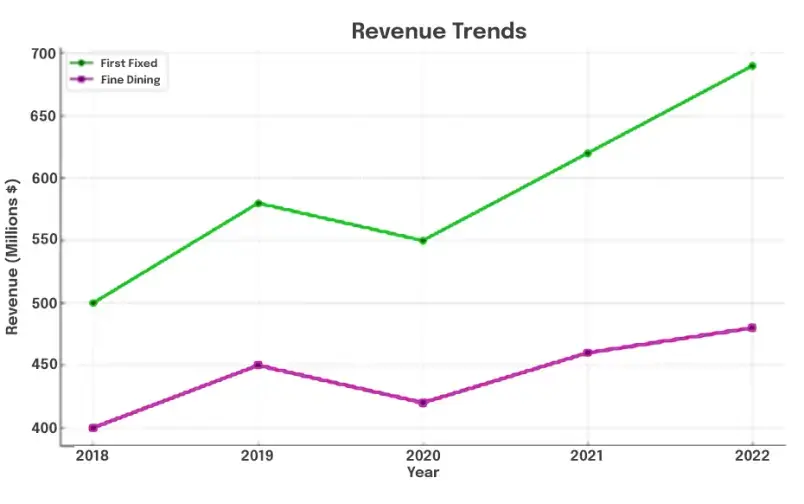
折れ線グラフ:
折れ線グラフは、データ ポイントを線で結んで、時間の経過に伴う傾向を示します。折れ線グラフを説明するときは、全体的な傾向、山と谷、および目立った変化やパターンに注目してください。
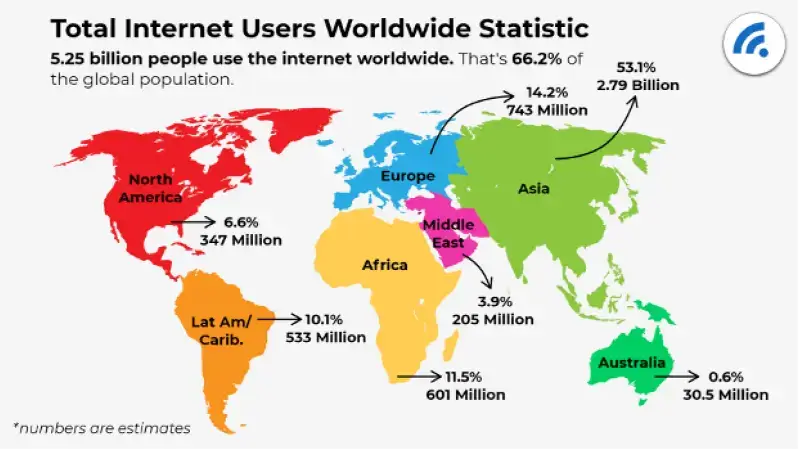
2. マップ:
地図には地理的な位置、ルート、分布が示されることがよくあります。地図の説明をするときは、重要なランドマーク、道順、注目すべきパターンや違いを強調表示します。
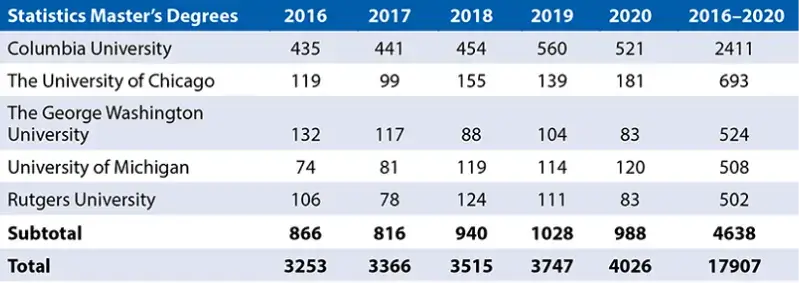
3.表:
テーブルはデータを行と列で表し、さまざまな情報のセットを比較するためによく使用されます。表の場合は、最高値と最低値、表全体の傾向、および有効数字ごとに主要な情報を要約します。
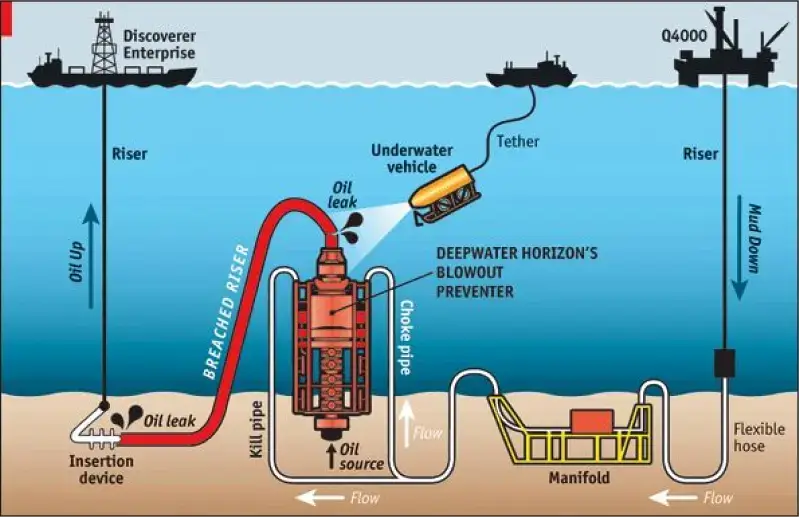
4. プロセス図またはフローチャート:
これらの図は、イベントのプロセスまたはシーケンスを示しています。あなたの仕事は、プロセスを段階的に説明し、順序を論理的かつ明確にカバーすることです。
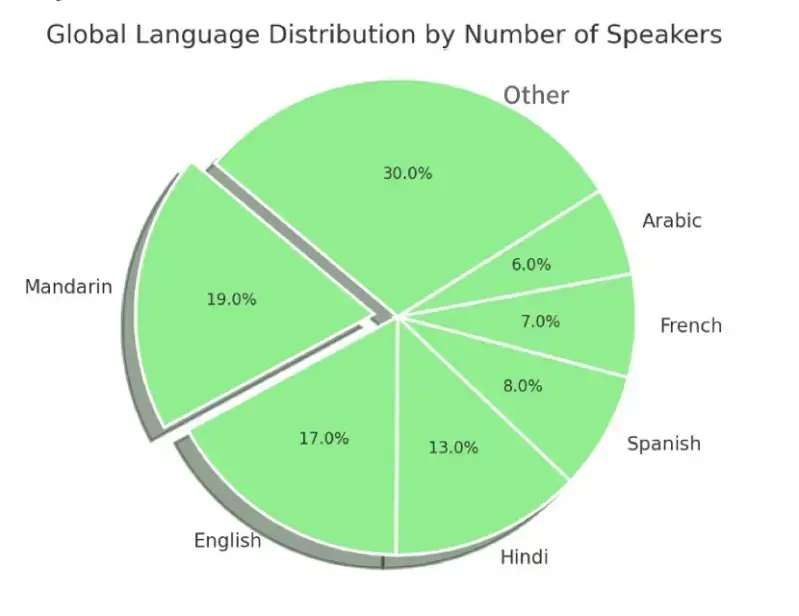
5. 円グラフ:
円グラフは、セクターに分割された円形のグラフで、それぞれが全体の割合を表します。説明には、最大セグメントと最小セグメント、セグメント間の比較、および注目すべき洞察を含める必要があります。
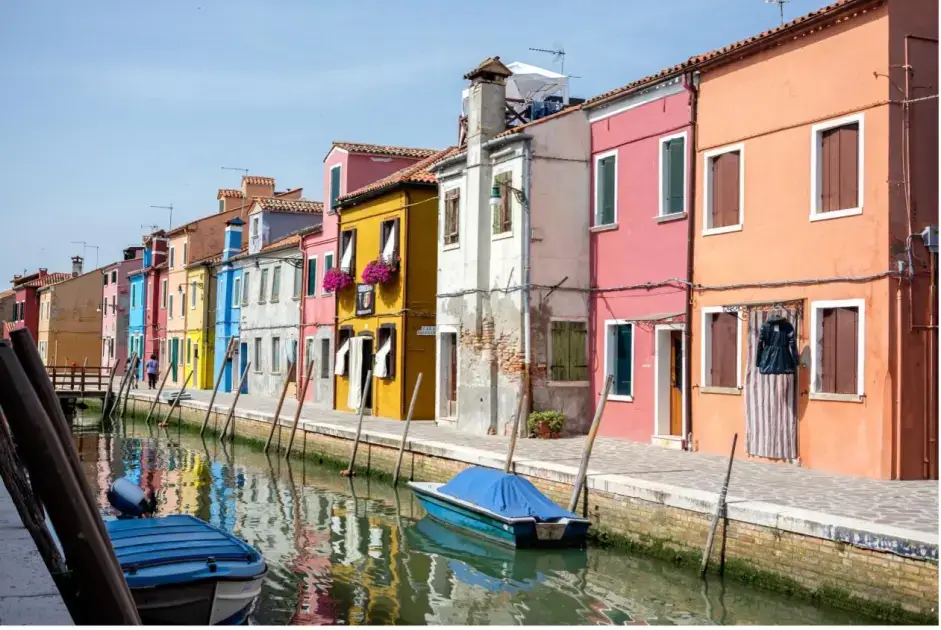
6. 写真または図:
プロセス、シーン、オブジェクトを描いた写真、イラスト、図などの画像に遭遇するかもしれません。この場合、画像の本質を捉えた主要な特徴、関連する詳細について説明します。

Describe Image PTE 練習 スタート
AI スコアリング、即時フィードバック、個別の改善ヒントを使用して、実際の試験スタイルのイメージを練習します

PTE Describe Image 練習問題
画面に画像が表示されます。準備時間は 25 秒です。画像を注意深く確認して、それに関連する回答をすることができます。この画像についてマイクで 40 秒間話し、観察できる限り詳細にその画像についての詳細を提供する必要があります。
正しい発音、流暢さ、イメージに関連した情報に気を配ることを忘れずに、明瞭に話しましょう。
画像の重要な側面をすべてカバーするように努めてください。そうすれば、答えは適切に構成されます。
録音が開始されると、マイクがオンになるまでの残り時間を示すカウントダウン タイマーが表示されます。タイマーが終了すると、短いビープ音が聞こえます。ビープ音が鳴ったら話し始めなければなりません。デバイスは音声を録音しないため、マイクがオンになる前に speaking を避けてください。
- speaking の間は急ぐ必要はありません。
- speaking を完了したら、回答を送信してください。
- タイマーが終了しても停止しない場合は、自動的に回答が提出されます。タイマーが停止したら録音を停止します。ステータス “Recording” が “Completed.” に変わります
- 回答は 1 回のみ記録できます。
以下に、理解して準備するための質問例をいくつか示します。
Sample Question 1:


Sample Question 2:
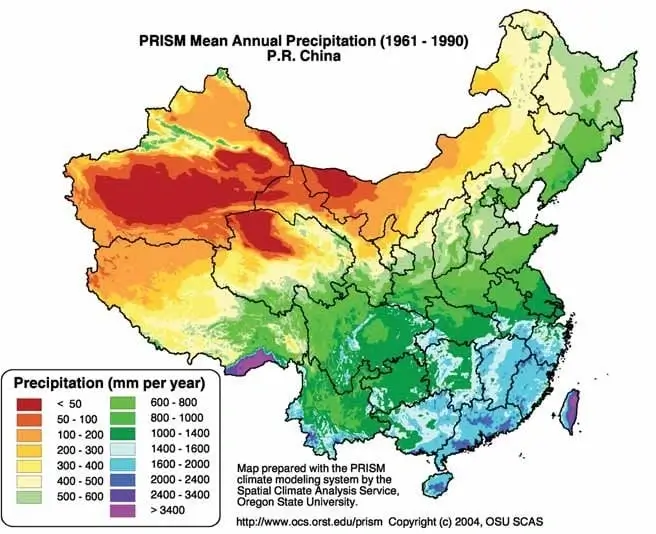
Sample Question 3:
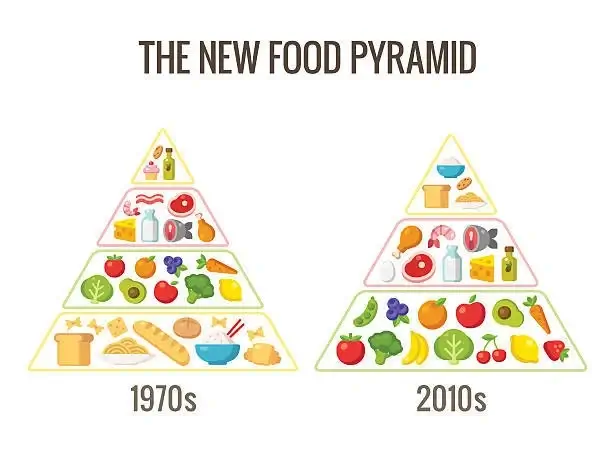
Sample Question 4:

Sample Question 5:
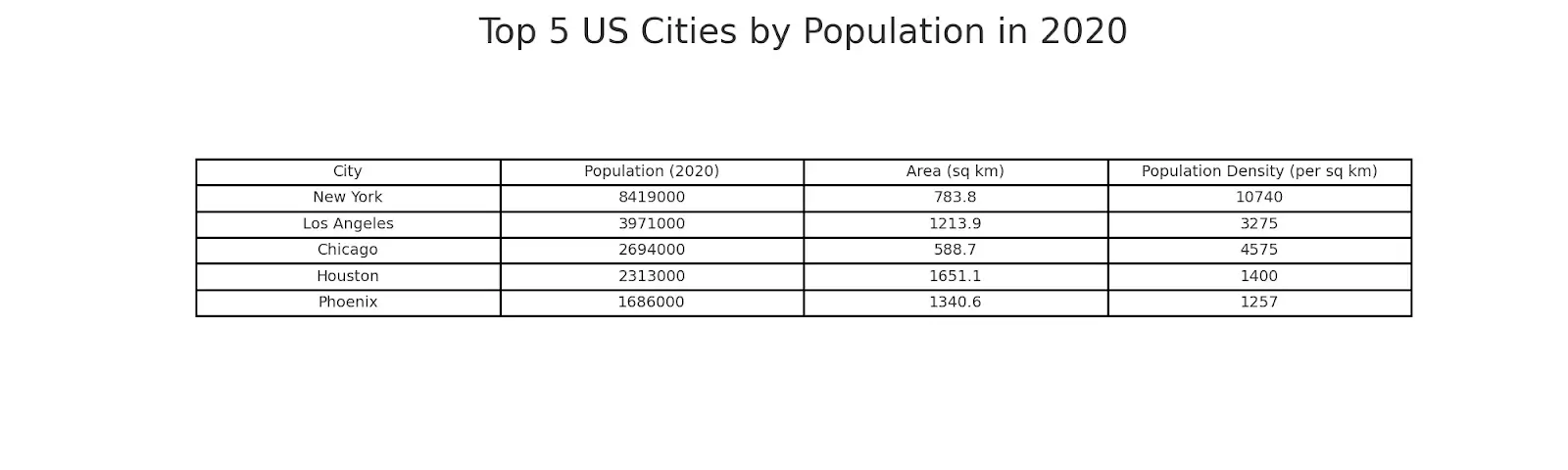
Sample Question 6:
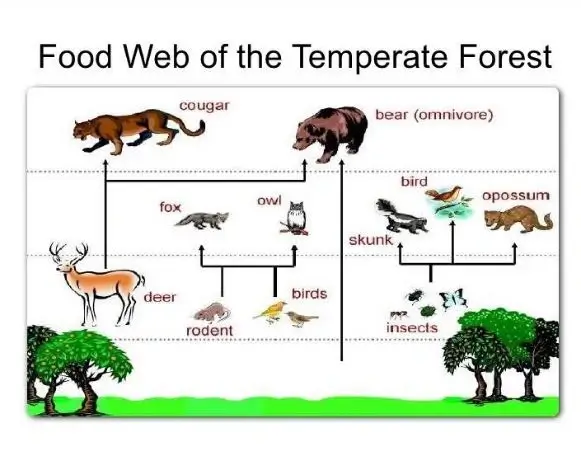
Sample Question 7:
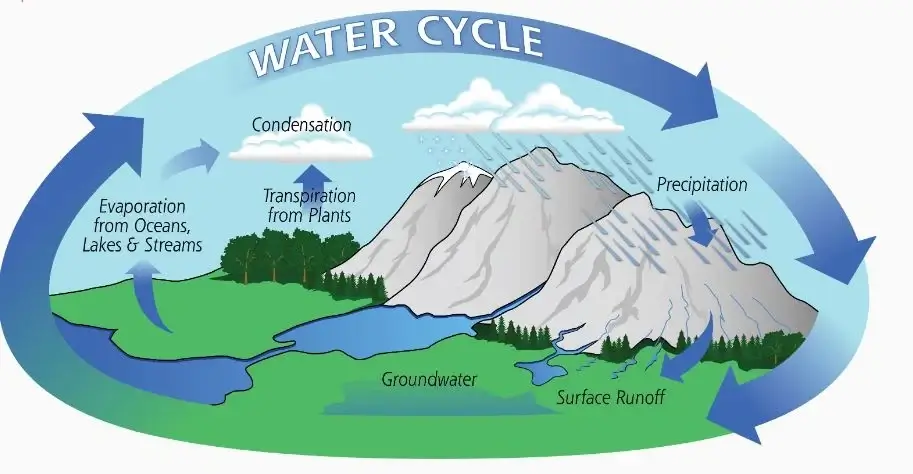
Sample Question 8:
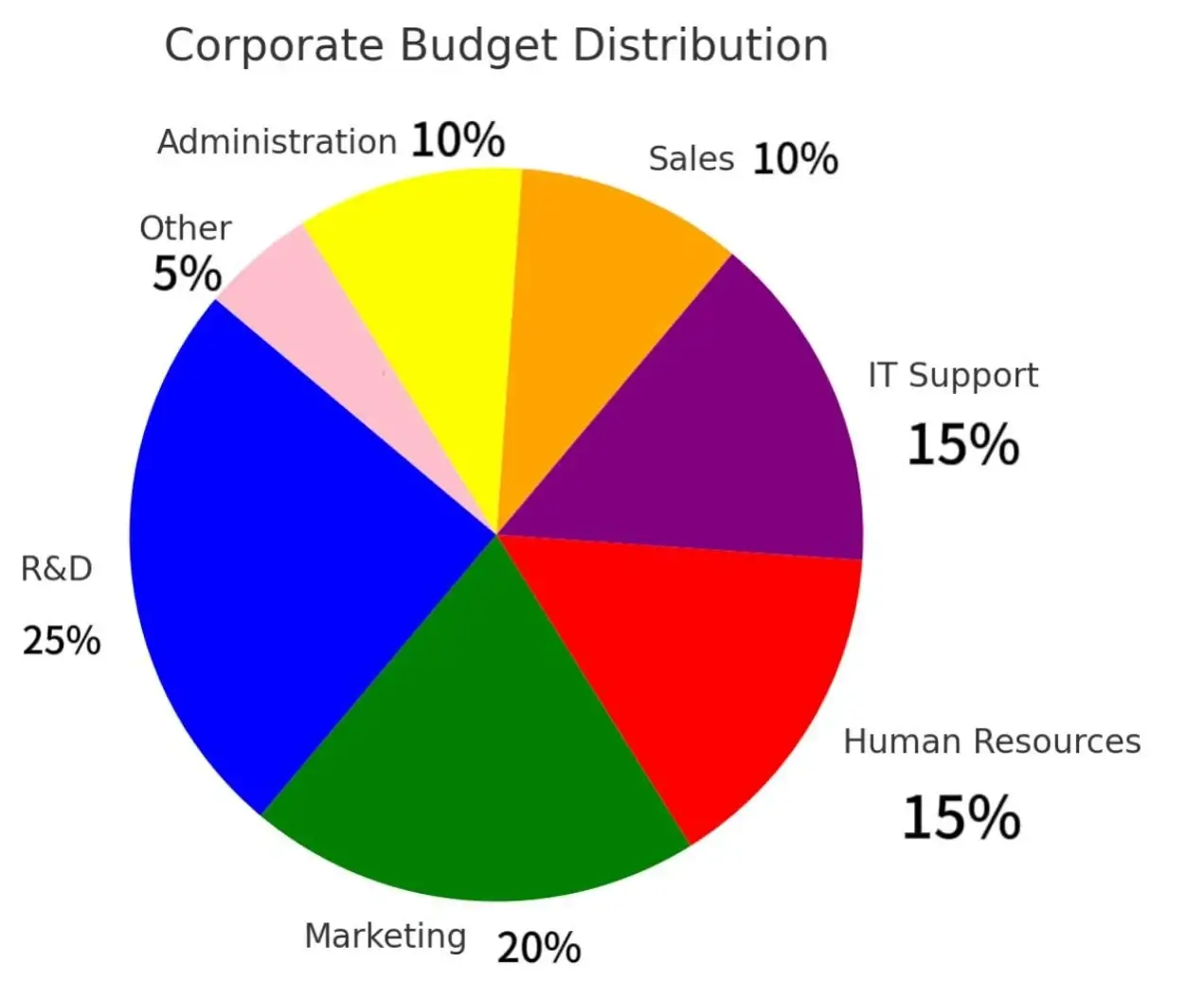
Sample Question 9:
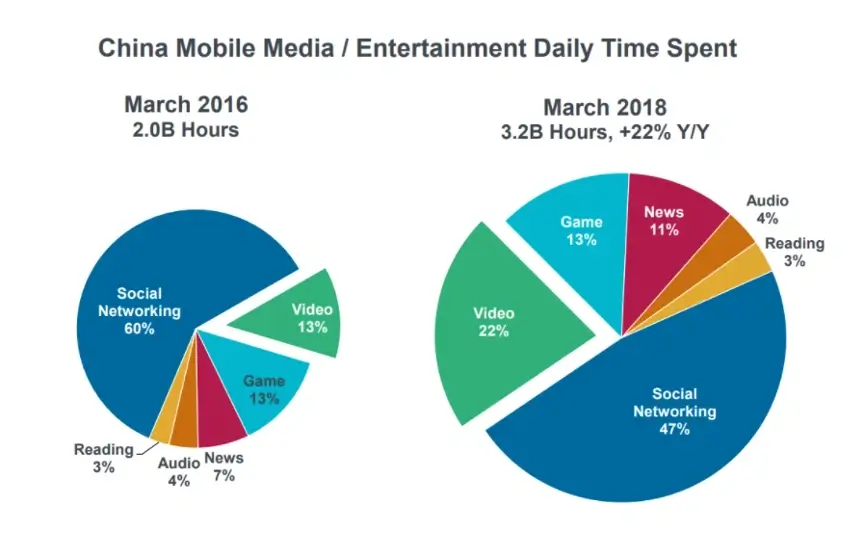
Sample Question 10:
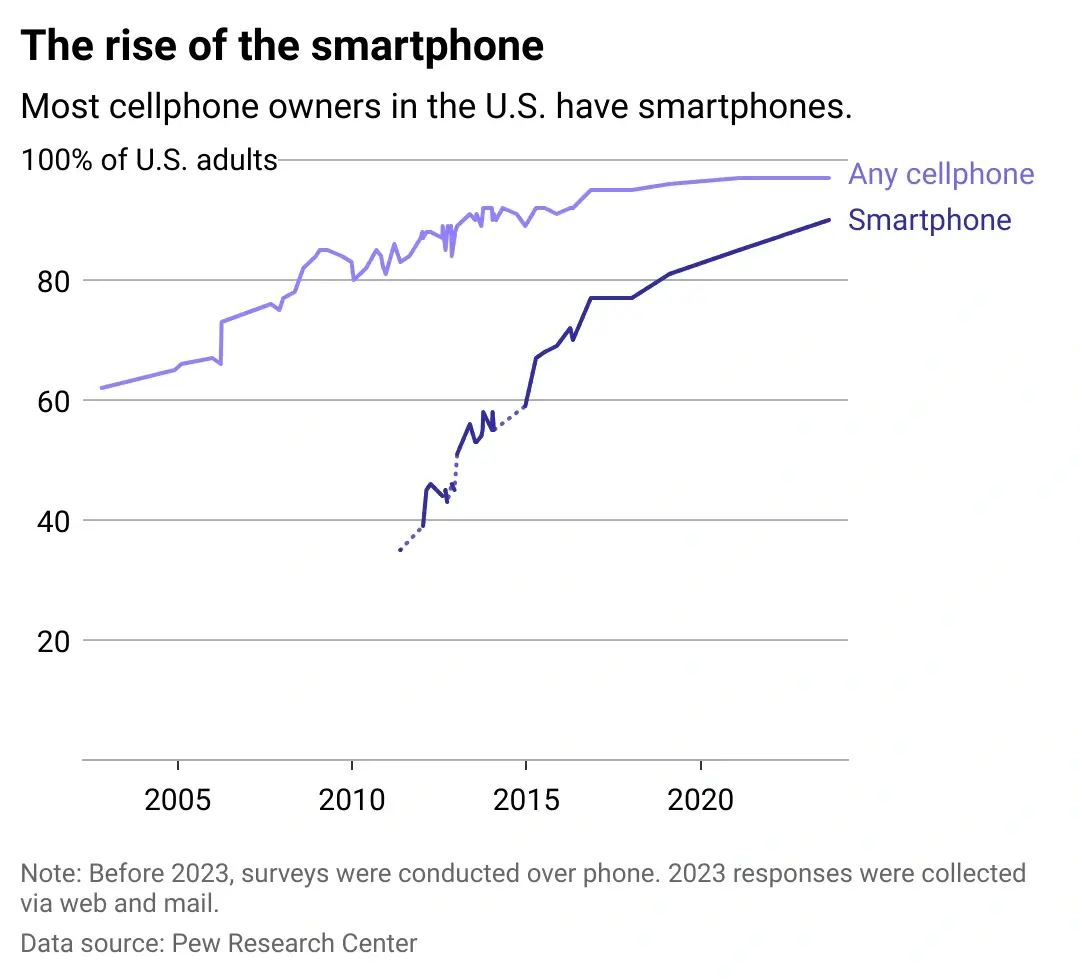
Describe Image PTE 練習 アクセス

成功のためのヒント PTE Describe Image 練習タスク:
画像を素早く理解する:
25 秒間の準備時間を賢明に活用してください。重要な要素を特定し、頭の中で応答を組み立てます。
主要な詳細に焦点を当てます。
すべての詳細を説明しようとすることは避けてください。画像全体のメッセージを伝える最も重要な側面に焦点を当てます。
適切な語彙を使用してください:
説明的かつ比較的な言葉を使用して、傾向、相違点、重要なポイントを強調します。
時間管理を実践する:
40 秒以内に話してください。この時間枠内で、簡潔でよく構成された説明を行う練習をしてください。
流暢になる:
Describe Image タスクでは流暢さが重要です。不必要に間をとったり、ためらったりせずに、スムーズに話すことを目指してください。これにより、明確で一貫した説明が可能になり、試験官に強い印象を与えることができます。
テンプレートを使用して PTEで 画像を効果的に説明する方法
構造化されたアプローチにより、PTE Speaking セクションで画像を効果的に説明する際の明瞭さと正確さを確保できます。まず、「“There is an interesting picture in front of me.”」と言って画像を紹介し、次に「“By having a closer look, I can see a number of things in the image.”」のようなフレーズでオブジェクト、人物、設定などの詳細を観察しながら主要な要素に進みます。 タイトルから始めます。
“The title is…” またはタイトルが指定されていないことを伝えてください。単語、形、“The image includes significant numbers/years/shapes such as…” などの有効な数字など、興味深い側面を特定します。目立つ色を指定することもできます: “There are beautiful colors like… and… is my favorite.”
グラフィック画像の場合は、“The graph gives information about the highest value like… and the lowest value which is…” の両極端を強調することが重要です。 40 秒以内に要約して結論を出し、「“I cannot go into further details as my time is over, so I will click next. Thank you.”」と言います
この describe image pte テンプレート により、説明が整理され、すべての主要な要素が効率的に網羅され、PTE Speaking セクションで良いスコアを獲得できるようになります。
これらのタイプのイメージに慣れ、PTE 模擬テスト, を定期的に練習することで、Describe Image のパフォーマンスを向上させ、自信を築き、PTE Academic, でより高いスコアを達成することができます。 UKVI または Core のスコア。
フルビデオを使用して、 PTE Describe Image







詳しく見る その他の PTE 問題
PTE 試験の各セクションのガイド

Speaking


Reading

PTE Describe Image? についてサポートが必要です
専門家のガイダンス、戦略、スコア向上のヒントについては、戦略ビデオをご覧ください。
よくある質問
よくある質問への回答はこちらです。
Describe Image は、Speaking パートの 3rd タスクであり、受験者は指定された画像について 40 秒間話す必要があります。この画像は、グラフ、チャート、ダイアグラム、地図、写真などです。
通常、受験者は、PTE Academic、UKVI、Core の Speaking セクションで 5-6 Describe Image の質問に遭遇します。
画像には、棒グラフ、円グラフ、折れ線グラフ、地図、プロセス図、フローチャート、物体、風景、人物の写真などを含めることができます。
レコーダーが開いて受験者の応答を記録する前に、画像を検討するための 25 秒の準備時間がかかります。
はい、テンプレートを使用すると、回答を構造化し、必要なポイントをすべて確実にカバーするのに役立ちます。ただし、テンプレートが柔軟であり、さまざまな種類の画像に適応できることを確認することが重要です。
いいえ、録画を一時停止したり再開したりすることはできません。マイクが開いたら、40 秒間ずっと話し続ける必要があります。
はい、このタスクは Speaking スコアに寄与するため、全体の PTE スコアに影響します。